Showing posts with label Android. Show all posts

Tune in to I/O Live at 2:30 a.m. EST on 28th June

This is a cross-post from the Official Google Blog


Google I/O, our annual developer conference, begins in just two days, and this year, we’re bringing you more than 130 technical sessions, 20 code labs and 155 Sandbox partners. If you’re not here in San Francisco, you can still sign up for one of our 350+ I/O Extended events around the world or tune in to I/O Live to watch the live stream from wherever you are. This year’s conference kicks off on June 28 with the first day’s keynote at 2:30 a.m. EST and the second day’s keynote on June 29 at 3:00 a.m. EST, so tune in early at developers.google.com/io to avoid missing the action!

Bookmark developers.google.com/io to watch I/O Live from your desktop, or download the Google I/O mobile app to access the live stream from your phone or tablet. For the truly entrepreneurial, check our liveblogging gadget, which lets you add your commentary and the live video feed from the Google I/O keynotes to your blog.

More than 40 sessions on Android, Chrome, Google+ and your favorite APIs will be streamed live, and all remaining session videos will be recorded and available shortly after the conference on Google Developers Live and the conference website. Between sessions, we’ll bring you behind-the-scenes footage featuring interviews with Googlers and attendees, tours of the Sandbox and more. The stream will also continue through our After Hours party (June 28 starting at 12:00 p.m. EST), where we've teamed up with top entertainers, inventors, artists, educators and visionaries from all over the world for an amazing evening. (Or lunchtime, if you're in Australia!)


Read More Here...

Rent thousands of full-length Aussie and global films on Google Play and YouTube

Australia has a long and rich history of cinema, with one of the world’s first studios, the Limelight Department, opening in Melbourne in 1897. Flash forward a century, and Australia is an indispensible part of the global film industry, represented by world famous directors such as Baz Luhrmann and Peter Weir as well as an almost endless list of actors, such as Cate Blanchett and Hugh Jackman.

This great tradition makes us excited to announce today that we have launched Movies on Google Play (play.google.com/movies) and a brand new Movies page on YouTube for Australia (youtube.com.au/movies), where you can rent thousands of films from both Hollywood and local Aussie studios. You can see films from The Walt Disney Company, Sony Pictures Home Entertainment, NBCUniversal, Village Roadshow Pictures and Lionsgate, as well as from local distributors such as Roadshow Films, Icon Film Distribution, Madman Entertainment, Hopscotch and Transmission Films.

Sit back and watch recent releases such as Oscar-award winning Midnight in Paris, The Help, Moneyball, Tower Heist and The Iron Lady as well as picks from a big library of all-time classics such as Toy Story 3 and The Bourne Ultimatum. If you are feeling in the mood for something local, check out break-out hits like 2011 release Snowtown or other Australian classics such as Bra Boys and Chopper.

On the web, you can rent and watch movies from Google Play and on YouTube. On Android phones and tablets, you can rent films from the Google Play store app and start watching them instantly on the Google Play Movies app. Movies can also be downloaded to the device so they’re available for viewing during the rental period without an internet connection. And if you are signed in using your Google Account, you can watch the same movies across both Google Play and YouTube.

Movies are available at competitive pricing, with new releases available at $5.99 for standard definition and $6.99 for high definition and library titles at $3.99 for standard definition and $4.99 for high definition. For most movies, viewers will have 30 days to begin watching their rental, and, once started, 48 hours to finish.

We will be adding many more recent and classic films over the course of the year so keep checking back to Google Play and YouTube to see what’s new.

Posted by Felicity Mcvay, Manager, Content Partnerships.

Read More Here...

Collaborate and edit anywhere with the updated Google Docs for Android

This is a cross-post from the Official Google Blog

As I was sitting on the ferry commuting to Google’s Sydney office this morning, two thoughts occurred to me. First, Australia is beautiful. If you’ve never been here, you really should visit. And second, it’s amazing how productive I can be with just my Android phone and an Internet connection. I was responding to email, reading news articles and editing documents—just like I do at the office. Only the view was better!

We want to give everyone the chance to be productive no matter where they are, so today we’re releasing a new update to the Google Docs app for Android. We've brought the collaborative experience from Google Docs on the desktop to your Android device. You'll see updates in real time as others type on their computers, tablets and phones, and you can just tap the document to join in.

We also updated the interface to make it easier to work with your documents on the go. For example, you can pinch to zoom and focus on a specific paragraph or see the whole document at a glance. We also added rich text formatting so you can do things like create a quick bullet list, add color to your documents, or just bold something important. Watch the new Google Docs app in action:


If you want to hear about the latest Docs news or send us feedback on the new app, visit Google Docs on Google+.

Gotta run—I’ve got another ferry to catch!


Read More Here...

Introducing Chrome for Android

This is a cross-post from the Google Mobile Blog.

In 2008, we launched Google Chrome to help make the web better. We’re excited that millions of people around the world use Chrome as their primary browser and we want to keep improving that experience. Today, we're introducing Chrome for Android Beta, which brings many of the things you’ve come to love about Chrome to your Android 4.0 Ice Cream Sandwich phone or tablet. Like the desktop version, Chrome for Android Beta is focused on speed and simplicity, but it also features seamless sign-in and sync so you can take your personalised web browsing experience with you wherever you go, across devices.

Speed With Chrome for Android, you can search, navigate and browse fast—Chrome fast. You can scroll through web pages as quickly as you can flick your finger. When searching, your top search results are loaded in the background as you type so pages appear instantly. And of course, both search and navigation can all be done quickly from the Chrome omnibox.

Simplicity Chrome for Android is designed from the ground up for mobile devices. We reimagined tabs so they fit just as naturally on a small-screen phone as they do on a larger screen tablet. You can flip or swipe between an unlimited number of tabs using intuitive gestures, as if you’re holding a deck of cards in the palm of your hands, each one a new window to the web.

One of the biggest pains of mobile browsing is selecting the correct link out of several on a small-screen device. Link Preview does away with hunting and pecking for links on a web page by automatically zooming in on links to make selecting the precise one easier. And as with Chrome on desktop, we built Chrome for Android with privacy in mind from the beginning, including incognito mode for private browsing and fine-grained privacy options (tap menu icon, ‘Settings,’ and then ‘Privacy’).

Sign in You can now bring your personalised Chrome experience with you to your Android phone or tablet. If you sign in to Chrome on your Android device, you can:

  • View open tabs: Access the tabs you left open on your computer (also signed into Chrome)—picking up exactly where you left off.
  • Get smarter suggestions: If you visit a site often on your computer, you'll also get an autocomplete suggestion for it on your mobile device, so you can spend less time typing.
  • Sync bookmarks: Conveniently access your favorite sites no matter where you are or which device you’re using.
Chrome is now available in Beta from Android Market, in select countries and languages for phones and tablets with Android 4.0, Ice Cream Sandwich. We’re eager to hear your feedback. Finally, we look forward to working closely with the developer community to create a better web on a platform that defines mobile.

Read More Here...

Android and Security

This is a cross-post from the Google Mobile Blog.

The last year has been a phenomenal one for the Android ecosystem. Device activations grew 250% year-on-year, and the total number of app downloads from Android Market topped 11 billion. As the platform continues to grow, we’re focused on bringing you the best new features and innovations - including in security.

Adding a new layer to Android security
Today we’re revealing a service we’ve developed, codenamed Bouncer, which provides automated scanning of Android Market for potentially malicious software without disrupting the user experience of Android Market or requiring developers to go through an application approval process.

The service performs a set of analyses on new applications, applications already in Android Market, and developer accounts. Here’s how it works: once an application is uploaded, the service immediately starts analysing it for known malware, spyware and trojans. It also looks for behaviors that indicate an application might be misbehaving, and compares it against previously analysed apps to detect possible red flags. We actually run every application on Google’s cloud infrastructure and simulate how it will run on an Android device to look for hidden, malicious behavior. We also analyse new developer accounts to help prevent malicious and repeat-offending developers from coming back.

Android malware downloads are decreasing
The service has been looking for malicious apps in Market for a while now, and between the first and second halves of 2011, we saw a 40% decrease in the number of potentially-malicious downloads from Android Market. This drop occurred at the same time that companies who market and sell anti-malware and security software have been reporting that malicious applications are on the rise. While it’s not possible to prevent bad people from building malware, the most important measurement is whether those bad applications are being installed from Android Market - and we know the rate is declining significantly.

Android makes malware less potent
In addition to using new services to help prevent malware, we designed Android from the beginning to make mobile malware less disruptive. In the PC model, malware has more potential to misuse your information. We learned from this approach, designing Android for Internet-connected devices. Some of Android’s core security features are:
  • Sandboxing: The Android platform uses a technique called “sandboxing” to put virtual walls between applications and other software on the device. So, if you download a malicious application, it can't access data on other parts of your phone and its potential harm is drastically limited.
  • Permissions: Android provides a permission system to help you understand the capabilities of the apps you install, and manage your own preferences. That way, if you see a game unnecessarily requests permission to send SMS, for example, you don’t need to install it.
  • Malware removal: Android is designed to prevent malware from modifying the platform or hiding from you, so it can be easily removed if your device is affected. Android Market also has the capability of remotely removing malware from your phone or tablet, if required.
No security approach is foolproof, and added scrutiny can often lead to important improvements. Our systems are getting better at detecting and eliminating malware every day, and we continue to invite the community to work with us to keep Android safe.

Posted by Hiroshi Lockheimer, VP of Engineering, Android

Read More Here...

An Aussie's take on Google I/O


I spent last week at Google I/O, Google’s annual conference for developers held in San Francisco. This conference is all about making the web a better place -- the nuts and bolts of software development that most folks don’t ever think about when they add apps to their Android phones or when they log into their Gmail. What’s interesting about all these developers getting stoked about building the apps of the future is that they take one thing for granted: high speed Internet connectivity. That’s not to say they don’t recognise that sometimes connectivity is slow or erratic -- they do, and we’re all trying to find ways to make sure our apps can work in those situations. What I mean is that their starting assumption is that high speed connectivity is fast becoming like electricity or running water -- never far away when you need it, and plenty of it. I love this optimism -- and it’s this optimism that is bringing the National Broadband Network to Australia.

Out of all the exciting announcements that came out of Google this week, every single one of them relies on high speed broadband. YouTube movie rentals -- tick. Syncing your music library and movies from Android Market across your PC and your Android tablet and phone -- tick. Using a Chromebook, where your apps, games, photos, music, movies and documents will be accessible wherever you are and you don't need to worry about losing your computer or forgetting to back up files -- tick. These products will run on the networks we we have now, but just imagine their potential -- and the potential of the ideas of all the developers in Moscone Center and those around the world watching Google I/O streamed over YouTube -- when we have high speed Internet everywhere.

Most of us in the Google Sydney office wish we had a dollar for every time someone asked us about the NBN, “Yeah, but what are you going to do with all that speed?” or “What’s Google’s vision for how to use all that bandwidth?” I think we saw a taste of it at Google I/O.

Originally posted on the Google Australia blog.

Read More Here...

Introducing Blogger Android App

Posted by Vinay Sekhri

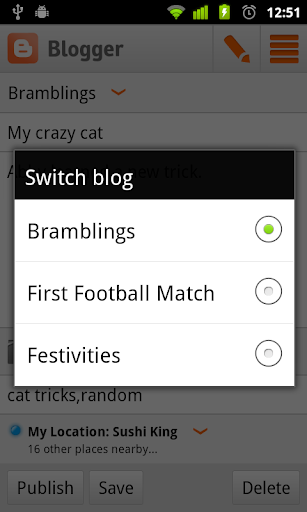
Have you ever wanted to write up a quick blog post on the go? Now there is an easy way to do this on your Android phone! We are excited to announce our first version of the Blogger Android App. Using the app you can easily compose a post, attach a photo that you just took with your phone, and either save it as a local draft for later or immediately publish it to your blog. If you are an Android user, you can start using the Blogger app today by downloading it for free from the Android Market.


Feature highlights
  • Multiple accounts and blogs: You can easily switch between different accounts and blogs that you have author rights to. Simply choose your account and blog and you are all set to go.


  • Write and save/publish: You can write a post, assign labels, and then either save it as a draft or immediately publish it. Saving as draft is handy if you need to wait until you have Internet connectivity.

  • Photos from camera and gallery: If you see something interesting, you can take a photo directly from the app and include it in the blog post. You can also browse your gallery to include the ones you like.

  • Sharing to Blogger from gallery or browser: Blogger is one of the available sharing options. If you come across a photo in the gallery, or a website while browsing, you can share the content to the Blogger app directly from the sharing menu.

  • Share location: You can share your location by activating the location bar and selecting the correct location. This information will be included in your post.

  • View saved/published posts: By switching to the List View, you can view all your drafts and published posts that you wrote using the app. By performing a long-press on a published post you can invoke a menu that includes the option to view your post in a browser.

We hope you enjoy the app. As always, we would love to hear what you think so please feel free to share your thoughts with us through our feedback form. (Note: this app is available only on Android devices but we are working toward supporting other smartphone platforms to allow more of our users to easily post to Blogger on the go.)

Read More Here...

Blog Archive