Showing posts with label mobile. Show all posts

A more dynamic mobile reading experience

Last year we introduced mobile templates on Blogger, and Dynamic Views for the desktop. Since then, over 2 million blogs have started using Dynamic Views on desktop, and users have asked us for more mobile features. So today, we’re bringing the speed and advanced reading experience of Dynamic Views to mobile.  Configuring your blog to use a Dynamic View on mobile will result in a reading experience that mirrors the desktop, but is optimized for mobile.

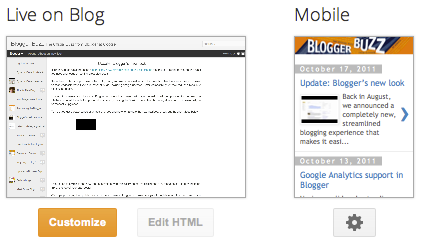
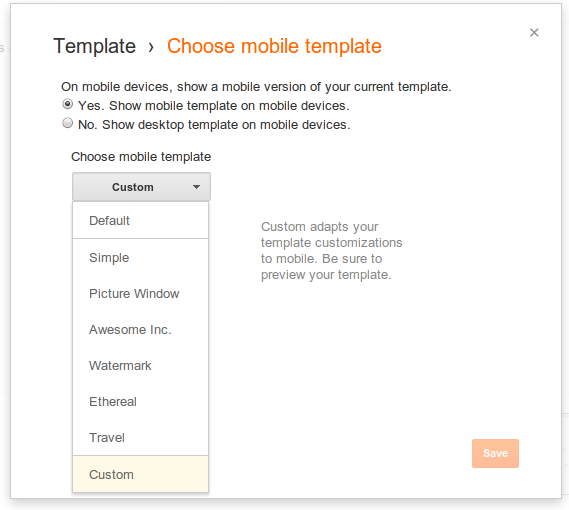
To configure a Dynamic View for mobile on your blog, select the "Template" tab, and then click on the settings cog under the “Mobile” preview.  


If you’re currently using Dynamic Views on the desktop and have the “Default” mobile template selected, you don’t need to do anything -- your blog will automatically start using the mobile optimized view when viewed from a compatible mobile browser. For more information, see Blogger Help.


Currently, only the “Classic” view, which is best suited for small screens, will be shown on mobile. Tablets with large screens will get the full desktop experience. As with the older mobile templates, supported browsers are WebKit-based browsers (such as Android Browser, Chrome for Android and iOS, and Mobile Safari).  

We hope your readers enjoy the modern, compelling experience that this mobile update provides.

Read More Here...

Make your mark on Google with Handwrite for Mobile and Tablet Search

Cross-posted from the Official Google Blog


Unlike searching on a desktop or laptop computer, when you're searching on a touch-screen mobile device it’s often inconvenient to type. So we strive to give you a variety of ways to interact with Google, be it by speaking your queries,getting results before you finish typing, or searching by image. Now there’s a new way for you to interact with Google: Handwrite for web search on mobile phones and tablets. 

Say you’re standing on a busy street corner, in a bumpy taxi ride, talking with a friend, or sitting on the couch with your tablet. Handwrite enables you to search by just writing letters with your finger most anywhere on your device’s screen—there’s no keyboard that covers half of the screen and no need for hunt-and-peck typing. 


Getting started is easy: go to Google.com in your mobile browser, tap on “Settings” at the bottom of the screen and enable “Handwrite.” Note that after you've saved the setting, you may need to refresh the homepage to see the feature.


On tablets, the Search settings are available as an option behind the gear icon.


Once the feature is enabled, tap the Handwrite icon on the bottom right corner of your screen to activate the writing surface. Write a few letters and you’ll see autocomplete options appear below the search box. If one of the options is what you’re looking for, just tap it to search. For longer queries, you can continue writing and use the arrows next to the autocompletions to move the right one into the search box. Since you can write anywhere, you don’t have to look back and forth repeatedly from the keyboard to the search box. 


For more tips and tricks on how to use Handwrite, see our Help Center article. To make accessing Google.com faster, be sure to bookmark it and add it to your home screen.

We designed Handwrite to complement rather than replace typing: with the feature enabled, you can still use the keyboard at any time by tapping on the search box. Handwrite is experimental, and works better in some browsers than others—on Android devices, it works best in Chrome. For now, we’ve enabled Handwrite for iOS5+ devices, Android 2.3+ phones and Android 4.0+ tablets—in 27 languages. 

Have fun with this new way of searching!


Read More Here...

Meet your clients’ new couch companion: the tablet

We have been saying that smartphones are the next big thing for a few years now, and with more than half of Australians now calling a smartphone their own, things are just getting bigger and bigger. While the smartphone revolution is in full effect, another revolution is silently happening in its shade: the growth of the other mobile device called tablet. According to Telsyte 2.6 million Australians already use a touchscreen tablet. By 2016, that number is forecast to grow to 11 million.

Looking at Google search queries, our consumer research, and other external surveys and commentary, we think that we have a pretty good overview of how the new wave of “multi-screen consumers” are using their different devices.

The PC has become the workhorse. When we think PC, we mostly think about admin tasks such as replying to work emails and working on our household budgets. The smartphone on the other hand is our “constant companion.” It gives us access to relevant and immediate information when we need it most: when we are out and about. Of course, it also helps us kill time on the bus.

At Google we like to think of the tablet as the “couch companion.” When we look at the activity on tablets, we see a sharp increase towards the end of the night, peaking very late around 9 pm. During that time we do things on the tablet that we enjoy while relaxing: listening to music, updating social media, watching video, researching interests and things we want to buy.

Watching TV at home is still the preferred form of entertainment for 64% of Australians, but we tend to be multitasking as more than half use smartphones and tablets while watching TV, following a Deloitte survey of more than 2,000 Australians across four generations. The survey also found that 60% of viewers multitask on electronic devices.

The current prices of tablets mean they are still regarded as a luxury item, rather than an essential one. This also means that the demography of owners are skewed to more affluent households, and this provides an opportunity for advertisers who covet that market. Many businesses see tablet users buy more on their website as well as buy more often.

On the tablet, marketers can reach engaged eyes that are on a device they purchased to research, and use to shop. My message to them: get on tablets now, your clients are already there.

Posted by Alexandre Lamvohee, Mobile Display Lead, Google Australia & New Zealand

Read More Here...

GoMo Australia: Helping businesses create a mobile friendly website

When it comes to mobile, your customers are moving faster than you know: according to our research, 60% of Australians expect the websites they visit on their phones to be as easy to navigate and access as on a desktop PC. That’s why last month, we launched the GoMoMeter, which helps you figure out whether or not your business is prepared for the mobile revolution by showing you what your website looks like on mobile. Now, we’re adding even more resources to help you go mobile (or “Go Mo,” as we like to say).


For starters, we’ve added a list of best practices for mobile sites, as well as research data to help you understand consumer behaviour on mobile devices. You can also download an advertiser guidebook with extensive tools and resources that can help your business to Go Mobile. Finally, we’ve added list of Aussie web developers who can help you take your site mobile.

So if you are ready to Go Mo, head to howtogomo.com/au and get started!


Posted by Soyeon Kim, Mobile Product Marketing Manager.

Read More Here...

Android and Security

This is a cross-post from the Google Mobile Blog.

The last year has been a phenomenal one for the Android ecosystem. Device activations grew 250% year-on-year, and the total number of app downloads from Android Market topped 11 billion. As the platform continues to grow, we’re focused on bringing you the best new features and innovations - including in security.

Adding a new layer to Android security
Today we’re revealing a service we’ve developed, codenamed Bouncer, which provides automated scanning of Android Market for potentially malicious software without disrupting the user experience of Android Market or requiring developers to go through an application approval process.

The service performs a set of analyses on new applications, applications already in Android Market, and developer accounts. Here’s how it works: once an application is uploaded, the service immediately starts analysing it for known malware, spyware and trojans. It also looks for behaviors that indicate an application might be misbehaving, and compares it against previously analysed apps to detect possible red flags. We actually run every application on Google’s cloud infrastructure and simulate how it will run on an Android device to look for hidden, malicious behavior. We also analyse new developer accounts to help prevent malicious and repeat-offending developers from coming back.

Android malware downloads are decreasing
The service has been looking for malicious apps in Market for a while now, and between the first and second halves of 2011, we saw a 40% decrease in the number of potentially-malicious downloads from Android Market. This drop occurred at the same time that companies who market and sell anti-malware and security software have been reporting that malicious applications are on the rise. While it’s not possible to prevent bad people from building malware, the most important measurement is whether those bad applications are being installed from Android Market - and we know the rate is declining significantly.

Android makes malware less potent
In addition to using new services to help prevent malware, we designed Android from the beginning to make mobile malware less disruptive. In the PC model, malware has more potential to misuse your information. We learned from this approach, designing Android for Internet-connected devices. Some of Android’s core security features are:
  • Sandboxing: The Android platform uses a technique called “sandboxing” to put virtual walls between applications and other software on the device. So, if you download a malicious application, it can't access data on other parts of your phone and its potential harm is drastically limited.
  • Permissions: Android provides a permission system to help you understand the capabilities of the apps you install, and manage your own preferences. That way, if you see a game unnecessarily requests permission to send SMS, for example, you don’t need to install it.
  • Malware removal: Android is designed to prevent malware from modifying the platform or hiding from you, so it can be easily removed if your device is affected. Android Market also has the capability of remotely removing malware from your phone or tablet, if required.
No security approach is foolproof, and added scrutiny can often lead to important improvements. Our systems are getting better at detecting and eliminating malware every day, and we continue to invite the community to work with us to keep Android safe.

Posted by Hiroshi Lockheimer, VP of Engineering, Android

Read More Here...

Introducing custom mobile templates

(Cross-posted from the Blogger Developers Network Blog)

Many Bloggers put a lot of time and effort into creating a unique look for their blog, so today we’re excited to announce that custom templates are now available for mobile devices.

Side by side comparison of web and mobile experience.

If you have a custom template for your blog and want it to appear on mobile browsers as well, visit the “Template” tab of your dashboard, click on the gear icon beneath the mobile template preview, and select “Custom” from the “Choose mobile template” pulldown.


For more technical details and sample code, head over to the Blogger Developers Network blog.

We hope you enjoy creating your own custom mobile templates and sharing them with your readers.

Posted by Brett Morgan, Developer Relations Engineer


Read More Here...

Announcing the Blogger app for iOS

Today we’re excited to announce the new Blogger app for iOS. With the Blogger app, you can write a new blog post and publish it immediately or save it as a draft right from your iOS device. You can also open a blog post you've been working on from your computer and continue editing it while you're on-the-go. Your blog posts are automatically synced across devices, so you’ll always have access to the latest version.

Pictures are worth a thousand words, and the Blogger app makes it easy to add photos either by choosing from the gallery or taking a new photo right within the app. You can also add labels and location to provide more details about the post.


Download the Blogger app today for iOS versions 3.2 and above in the App Store. Although the user interface is only available in English at this time, the app supports blog posts written in all languages. If you’re using an Android-powered device, you can download the Blogger app for Android from the Android Market.

Posted by Chang Kim, Product Manager

Read More Here...

Smartphones at the dinner table? Smartphone trendspotting down under


Here’s a question for all of you smartphone owners out there: If someone asked you whether you’d rather give up your phone or your TV, what would you say?

Earlier this year, Google teamed up with IPSOS Research to learn the answer to this exact question (and many others) by asking 30,000 people in 30 countries about how they use their smartphones, and where (on the bus? at the office?). It’s the first time anyone has asked this many people the same questions, for free: that means we can compare and contrast behaviour and trends across different age groups, different cities, and even countries.

So what did we learn about Australia? To start with, those of us at Google Australia were particularly proud to discover that Australia has the second highest smartphone penetration in the world -- ahead of the US, UK, and Japan. This is a recent achievement for the land down under. The majority of smartphone owners we surveyed had bought their device in the preceeding 12 months, which means that Australia went from lagging to leading the worldwide smartphone revolution in just one year. We estimate that each month, 1-2% of the entire population of Australia buys a smartphone.

Here are a few other fun facts we found when we took a look at the numbers:
  • Not just on the go: You may think that your smartphoneis an “on the go” device, something you can use to kill time in line at thegrocery store or check email on the train. But our survey found that 81% of Australians used their smartphones at home during the past 7 days--compared to just 66% on the go. Nearly 1 in 2 use their smartphone while watching TV, while 1 in 3 use smartphones and another Internet-enabled device at the same time.
  • Smartphones are good for business: 49% use their smartphone to research and then call businesses--while 45% visit a business they’ve found using their smartphone.
  • We can now indulge our obsession with real estate 24x7: 1 in 5 Australians we surveyed had looked for an apartment or house with their smartphone--a figure 33% higher than the US or UK.
  • Search is big on smartphones: 2 in 5 of Australian smartphone owners use mobile search daily--more than the UK or Germany, and almost as high as the number who use desktop search daily.
  • Apps, apps, apps: our Australian survey respondents had 25 apps on average per smartphone--that’s versus 23 in the US & UK. They’re not just free apps, either; Australians averaged 8 paid apps per phone.
  • And now, the answer we’ve all been waiting for... 1 in 5 Aussie smartphone owners would rather give up their TV than their smartphone.
So what does this mean (aside from smartphones at the dinner table)? First, Australians are buying more smartphones, faster, than the rest of the world--and they’re using them more, too. Second, as more and more of us embrace the smartphone revolution, we’ll be watching more videos, searching for more businesses, buying more apps, and sharing more via mobile. In other words, there are a host of new opportunities for developers, web publishers, video creators, retailers, and advertisers to build and grow their businesses on mobile.


If you want to learn more, stay tuned: we’ll be making our global survey results public, in their entirety, for everyone who wants a closer look at the global mobile revolution.

Posted by Jason Pellegrino, Head of Mobile Ads, Google Australia and New Zealand

Read More Here...

Announcing Blogger Mobile Templates

Posted by Jiho Han, Software Engineer

A few months ago we introduced mobile templates to Blogger in Draft. Today, we’re excited to announce that not only will these templates be available to everyone, we’ll be supporting all 27 Template Designer templates. We invite you to make your blog smartphone-friendly by going to the Dashboard > Settings > Email & Mobile tab and enabling the mobile template option.


Blogger mobile templates are mobile-optimized versions of our Template Designer templates. If you are using one of these templates, when you enable the mobile template option your blog will begin rendering using the mobile version of the same variant. Even if you are not using a Template Designer template, or using a heavily-customized version of one, you can still enable this feature to have your blog start rendering in a generic default mobile template that we have created.


Some of our feature highlights:
  • Preview: Get a glimpse of how your blog will be displayed by clicking on the Mobile Preview button. You can also see it on your smartphone by scanning the QR-code.

  • Automatic redirection: Viewers will see the mobile version of your blog when accessing from smartphones*.

  • Template support: We are now supporting all 27 templates. Some gadgets are also supported**.

  • Mobile ads: Mobile AdSense ads will be displayed at the top of the post pages and at the bottom of the index page if the blog has an AdSense gadget or in-line blog ads.

  • Comments and videos: Viewers on smartphone devices will be able to make comments and watch videos.


We hope you enjoy the mobile templates. As always, we would love to hear from you so please let us know what you think through our feedback form, and stay tuned for future improvements.

*WebKit-based mobile browsers are supported for this launch.
**Supported gadgets/elements in this launch: Header, Blog, Profile, AdSense, Attribution.

Read More Here...

Blog Archive